Datalogic Magellan 900i vs Zebra DS9308 — Presentation Scanners
Two hands-free 1D/2D presentation scanners for staffed checkouts, compared side-by-side — including IO Resource’s own bench-test findings on trigger response, phone-screen reading and configuration effort.
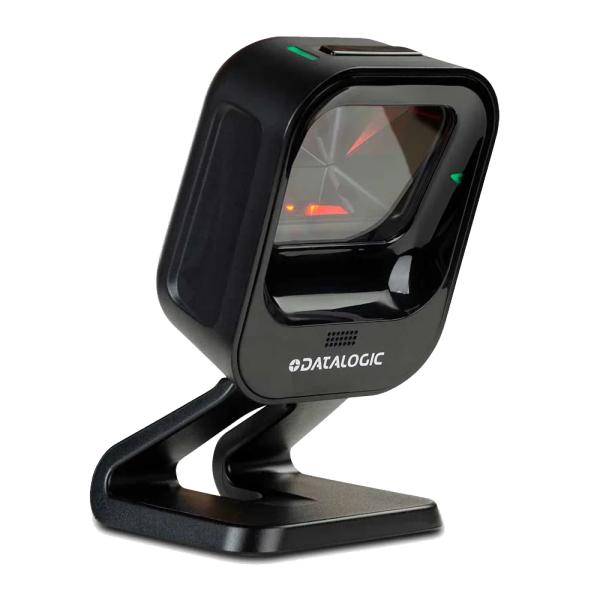
Datalogic
Magellan 900i
Compact omnidirectional 1D/2D presentation scanner for retail and service counters. Proximity-triggered scanning, on-device configuration, phone-screen reading out of the box, 3-year factory warranty.
View full specsarrow_forward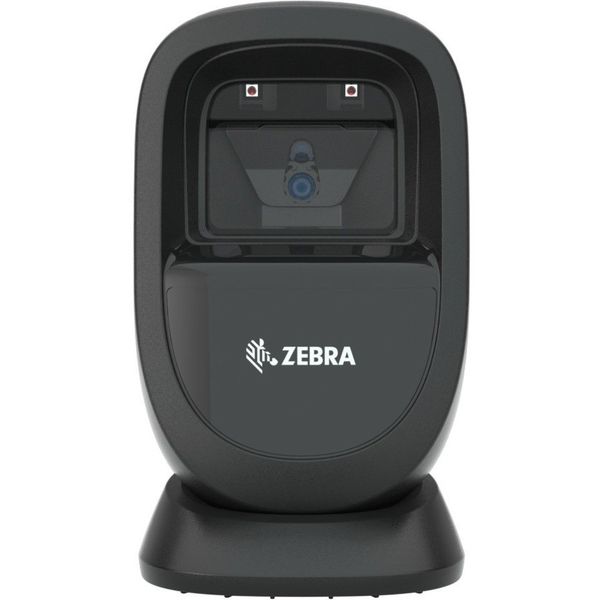
Zebra
DS9308
Presentation barcode scanner for retail checkout. Reads 1D/2D barcodes from labels and phone screens; configured via Zebra’s 123Scan utility. 1.5 m drop specification.
View full specsarrow_forwardSide by side
| Spec | Datalogic Magellan 900i | Zebra DS9308 |
|---|---|---|
| Scanner type | Omnidirectional 1D/2D presentation imager | Omnidirectional 1D/2D presentation imager |
| Sensor | 1 MP image capture | 1280 × 800 pixels |
| Mobile screen reading | Yes — out of the box | Yes |
| Trigger behaviour | Proximity sensor — reads on approach (IOR bench test, May 2026) | Present-and-hold in front of window (IOR bench test, May 2026) |
| Configuration | On-device (button-hold gestures) + Datalogic software | 123Scan utility (Windows, USB) |
| Host interfaces | USB Keyboard, USB COM (virtual serial), OEM (IBM) USB, RS-232 | USB, RS-232, Keyboard Wedge, TGCS (IBM) 46XX over RS485 |
| Dimensions | 7.6 × 7.8 × 14.0 cm (tilting riser) | 14.5 × 8.6 × 8.3 cm |
| Weight | 345 g (tilting stand); 200 g (kiosk/OEM) | 318 g |
| Sealing | IP52 | IP52 |
| Drop specification | 1.2 m to concrete | 1.5 m to concrete |
| EAS | Checkpoint EAS compatible | Checkpoint EAS compatible |
| Warranty | 3-year factory | 3 years |
| Premium step-up | Magellan 1500i (black/white, optional Digimarc) | — |
Scanner type
- Datalogic Magellan 900i
- Omnidirectional 1D/2D presentation imager
- Zebra DS9308
- Omnidirectional 1D/2D presentation imager
Sensor
- Datalogic Magellan 900i
- 1 MP image capture
- Zebra DS9308
- 1280 × 800 pixels
Mobile screen reading
- Datalogic Magellan 900i
- Yes — out of the box
- Zebra DS9308
- Yes
Trigger behaviour
- Datalogic Magellan 900i
- Proximity sensor — reads on approach (IOR bench test, May 2026)
- Zebra DS9308
- Present-and-hold in front of window (IOR bench test, May 2026)
Configuration
- Datalogic Magellan 900i
- On-device (button-hold gestures) + Datalogic software
- Zebra DS9308
- 123Scan utility (Windows, USB)
Host interfaces
- Datalogic Magellan 900i
- USB Keyboard, USB COM (virtual serial), OEM (IBM) USB, RS-232
- Zebra DS9308
- USB, RS-232, Keyboard Wedge, TGCS (IBM) 46XX over RS485
Dimensions
- Datalogic Magellan 900i
- 7.6 × 7.8 × 14.0 cm (tilting riser)
- Zebra DS9308
- 14.5 × 8.6 × 8.3 cm
Weight
- Datalogic Magellan 900i
- 345 g (tilting stand); 200 g (kiosk/OEM)
- Zebra DS9308
- 318 g
Sealing
- Datalogic Magellan 900i
- IP52
- Zebra DS9308
- IP52
Drop specification
- Datalogic Magellan 900i
- 1.2 m to concrete
- Zebra DS9308
- 1.5 m to concrete
EAS
- Datalogic Magellan 900i
- Checkpoint EAS compatible
- Zebra DS9308
- Checkpoint EAS compatible
Warranty
- Datalogic Magellan 900i
- 3-year factory
- Zebra DS9308
- 3 years
Premium step-up
- Datalogic Magellan 900i
- Magellan 1500i (black/white, optional Digimarc)
- Zebra DS9308
- —
The Zebra DS9308 has been the default presentation scanner at Irish and UK checkouts for years. The Datalogic Magellan 900i is the direct like-for-like alternative — same hands-free presentation format, same 1D/2D imaging, same three-year warranty — and in our own side-by-side bench testing it was the stronger scanner in the moments that matter at a till. Here is the full comparison.
At a glance
Both are compact omnidirectional 1D/2D presentation imagers for staffed checkouts, service counters, pharmacy counters and click-and-collect desks. Both read printed labels and barcodes on phone screens, both are IP52-sealed, both support Checkpoint EAS deactivation, and both carry a 3-year factory warranty. On paper they are close. The differences show up in how they behave at the counter and how much effort they take to configure and support — which is where the 900i pulls ahead.
At the counter
In IO Resource’s bench test (May 2026, run by our technical team against a current DS9308), the Magellan 900i’s proximity sensor consistently triggered as the item approached the scanner, where the DS9308 needed a more deliberate present-and-hold in front of the window. Over a shift of hundreds of scans, that difference is what operators describe as a scanner feeling “fast” or “slow” — first-pass reads with less repositioning.
Phone-screen barcodes — loyalty cards, digital coupons, click-and-collect QR codes — read out of the box on both scanners. The 900i handled them with no configuration changes in our testing, which matters because screen-based codes are now a majority of loyalty scans in convenience retail.
Setup and day-two support
Include scanner configuration in the deployment plan. IOR can help confirm beeper settings, scan-data formatting and the required interface on an evaluation unit, then document the agreed setup for rollout.
A small detail that generates a disproportionate share of support calls: the carriage-return (Enter) suffix that most POS applications expect after a scan. The 900i shipped with it enabled by default in our testing; on Zebra scanners it typically has to be programmed on with a configuration barcode — the single most common “scanner not working” call we see on new installs.
One honest note in the other direction: on Datalogic scanners, data-dense QR modes such as Kanji code ship disabled as a security default. If your application needs them, enabling is a three-barcode scan from the quick-start guide — we do this as part of pre-staging on configured orders.
Build, environment and interfaces
Specify the Magellan 900i mounting arrangement for the counter and check the required handling conditions. The published drop ratings in this comparison are 1.2 m for the 900i and 1.5 m for the DS9308; confirm the proposed configuration meets the site requirements before ordering.
Both scanners cover the interfaces a modern estate needs. The 900i ships with USB Keyboard, USB COM (virtual serial), OEM (IBM) USB and RS-232 — the virtual-COM option is the one integrators ask for, because it lets POS software read scan data as a serial stream over a single USB cable. The DS9308 offers USB, RS-232, keyboard wedge and TGCS (IBM) 46XX over RS485.
Need a premium finish? Step up to the Magellan 1500i
For a customer-facing counter with different finish or mounting requirements, ask IOR to compare the Magellan 1500i as a premium option alongside the 900i. Confirm the required decoding features and configuration on the quotation.
Our recommendation — Datalogic Magellan 900i
For staffed checkout and counter scanning across retail, convenience, pharmacy and hospitality, we recommend the Magellan 900i over the Zebra DS9308:
- Faster first-pass scanning at the counter — the proximity trigger reads on approach, verified in our own May 2026 bench test.
- Phone-screen loyalty and coupon codes read out of the box, no configuration required.
- On-device configuration — volume and reset without 123Scan, a laptop or a site visit.
- Carriage-return suffix enabled by default — the most common new-install support call, eliminated.
- A premium step-up path (Magellan 1500i) on the same platform for customer-facing counters.
IO Resource stocks the Magellan 900i and 1500i in Ireland for next-day delivery, pre-configured to your POS spec, with a 3-year factory warranty behind both. Request a trade quote or an evaluation unit and test it against your own till.
Zebra, DS9308 and 123Scan are trademarks of Zebra Technologies Corporation, used for identification and comparison purposes only. Specifications from the manufacturers’ published datasheets; counter-behaviour findings from IO Resource bench testing, May 2026.
Product names, logos and trademarks are the property of their respective owners, including Zebra Technologies Corporation, and are used for identification and comparison purposes only. Refer to the sources and any testing notes in each guide, and confirm the exact configuration and current specifications with our team before ordering. Comparison content does not imply manufacturer endorsement.
Found this useful? Get new guides and industry insights in your inbox.
Sign upPlan your next deployment with IOR
Send us your application, quantities and site requirements. We can help evaluate the recommended alternative and scope your rollout.