NCR RealPOS 7197 — Current Replacement Path
For NCR RealPOS 7197 estates, the in-family path is 7197 to 7199 to 7199 Series II. Epson TM-T88VII and TM-T20IV are the leading non-NCR alternatives.
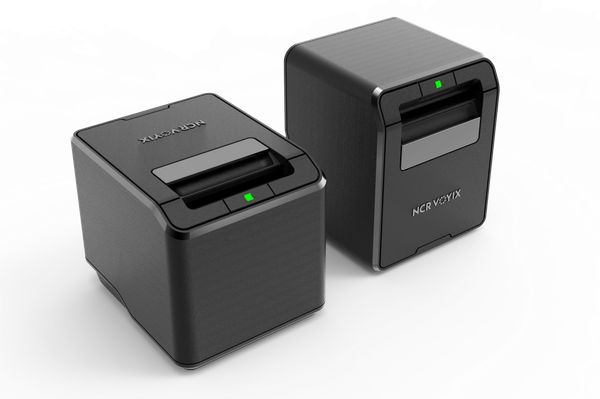
NCR Voyix
7199 Series II — the in-family successor
The current NCR in-family upgrade for standard 7197 and 7199 receipt-printing estates, with high-speed 80 mm thermal output and flexible interfaces.
View full specsarrow_forwardNCR
RealPOS 7197 — legacy model
The standard 7197 receipt-printer role now moves through the NCR 7199 family to the current 7199 Series II.
For the standard NCR RealPOS 7197 receipt-printer role, the NCR in-family replacement path is 7197 to 7199 and now to the NCR Voyix 7199 Series II. That is the first option to assess when an estate wants to remain on NCR hardware.
Current NCR option: 7199 Series II
The 7199 Series II is a high-performance 80 mm thermal receipt printer rated up to 406.4 mm/s, with USB and optional serial or Ethernet connectivity. Its TM-T88VII emulation and standard POS driver support can help integration, but the exact driver, interface and application behaviour should still be tested before rollout.
Leading non-NCR alternatives
Where the project is open to another manufacturer, the Epson TM-T88VII is our lead high-throughput alternative for staffed tills. The Epson TM-T20IV is the budget-led option for standard receipt-printing workloads. We will specify the interface version and accessories against the existing lane.
Related 71xx models need workflow-specific advice
The 7198, 7167 and 7168 are not all direct equivalents of the 7197. Two-sided, validation, slip and multifunction workflows may need a different printer or a combination of devices. Tell us what the printer does in the application before choosing a replacement.
Migration notes
- Drivers and emulation: have the POS software provider confirm the supported driver or emulation mode for the chosen printer.
- Interfaces and power: record USB, serial or Ethernet connectivity, power-supply placement and any integrated-terminal cabling.
- Application testing: validate printing, cutting, cash-drawer triggering, logos and error handling on one complete till before rollout.
- Media and fit: confirm roll width, counter footprint, cable exit and any wall or integrated mounting requirements.
Send us the till count, current printer models and interface mix and we will quote the replacement estate, staged and configured.
NCR and RealPOS are trademarks of NCR Voyix Corporation or their respective owners, used for identification purposes only.
Product names, logos and trademarks are the property of their respective owners, including Zebra Technologies Corporation, and are used for identification and comparison purposes only. Refer to the sources and any testing notes in each guide, and confirm the exact configuration and current specifications with our team before ordering. Comparison content does not imply manufacturer endorsement.
Found this useful? Get new guides and industry insights in your inbox.
Sign upPlan your next deployment with IOR
Send us your application, quantities and site requirements. We can help evaluate the recommended alternative and scope your rollout.